Everyday AI use tools are conversational and generative software applications, like ChatGPT, Google Gemini, Microsoft Copilot, and Perplexity. These applications let regular people type a question or task in plain English and receive a useful, immediate response. You do not need to write code, hold a computer science degree, or sacrifice a weekend to learn them. Think of them as an always-on, infinitely patient research assistant, writing partner, and productivity coach, all rolled into one browser tab. This guide shows you exactly how to pick the right tool for the right job and build everyday AI habits that stick.
The shelf of AI books is growing faster than a startup’s Slack channel. Researchers, journalists, and well-meaning tech evangelists all say roughly the same thing: AI is transforming everything. Great. But if you are sitting at your desk on a Tuesday afternoon, trying to draft a client email and wondering which app to open first, that advice won’t get you very far.
This article is the field guide they forgot to include. I am going to look at the everyday AI use tools that show up most often in and give you a clear, practical picture of what each one does, where it shines, and how to weave it into the hours of your actual day. I have included much of this material in my book. But this article is going to be a bit different. I want to convince you to start using AI as a companion to your daily activities.
“You do not need to master AI. You need to use it — today, imperfectly, with the tasks already on your plate.”
— Rick Samara
Ready? Let’s build your AI toolkit from the ground up.
What Exactly Are Everyday AI Use Tools — and Why Should You Care?
Here is the simplest possible definition: everyday AI use tools are apps that let you have a conversation with a computer, and actually get something useful back.
Before the current generation of tools, you could ask a search engine a question. It would hand you a list of ten blue links and wish you luck. Now, you type a question and receive a full, thoughtful answer. An answer that is synthesized, explained, and formatted for you. That shift is significant.
Think of the difference this way: searching Google is like walking into a library and asking the librarian, “Which shelf?” Using an everyday AI tool is like having a knowledgeable friend sitting across the table who actually reads the books and summarizes what matters for your specific situation.
Here is why that matters for you specifically:
- You can draft faster emails, reports, proposals, and social posts.
- You can research smarter, get synthesized answers instead of 47 browser tabs.
- You can learn on demand, ask follow-up questions until a concept actually clicks.
- You can offload repetitive thinking, summarizing, reformatting, proofreading, and translating.
None of these requires you to be technical. They require only that you are willing to type a sentence and see what happens.
Which Everyday AI Use Tools Are Most Discussed in Current Literature?
If you have read any AI-focused book, article, or newsletter in the last two years, you have almost certainly met these four names. Here is a quick orientation before we go deeper.
OpenAI
ChatGPT
The tool that kicked off the public AI conversation. Versatile, conversational, and available in a free tier. GPT-4o powers the paid version and handles text, images, and file analysis.
Google Gemini
Google’s answer to ChatGPT, baked into Gmail, Docs, and Search. If your work already lives in Google Workspace, Gemini slots in with minimal friction.
Microsoft
Microsoft Copilot
Built into Windows 11, Edge, and Microsoft 365. If your team runs on Word, Excel, Teams, or Outlook, Copilot is already waiting for you in the toolbar.
Perplexity
Perplexity AI
The research specialist of the group. Every answer comes with numbered citations linked to the live web. Less of a creative partner, more of a fact-finding engine.
These four represent the core of what most people mean when they talk about using everyday AI use tools at work and at home. Each one is free to start (with paid upgrades available), and each has a browser-based version that works on any device.
How Do You Choose the Right Everyday AI Tool for a Specific Task?
Picking the wrong tool is like using a butter knife to open a paint can. It might eventually work, but there is a better option and your hand will hurt. Use this comparison table as your cheat sheet:
| Task | ChatGPT | Gemini | Copilot | Perplexity |
|---|---|---|---|---|
| Writing a first draft | ✓ Strong | ✓ Strong | ✓ Strong | Partial |
| Researching with live citations | Partial (paid) | ✓ Strong | ✓ Strong | ✓ Best-in-class |
| Summarizing a long document | ✓ Strong | ✓ Strong | ✓ Strong | Limited |
| Building Excel formulas | Partial | Partial | ✓ Native integration | ✗ |
| Brainstorming & creative ideas | ✓ Best-in-class | ✓ Strong | Moderate | ✗ |
| Answering questions about today’s news | Partial (paid) | ✓ Strong | ✓ Strong | ✓ Best-in-class |
| Editing and proofreading | ✓ Strong | ✓ Strong | ✓ Strong | ✗ |
| Already in your existing apps | ✗ Separate app | ✓ Google Workspace | ✓ Microsoft 365 | ✗ Separate app |
You do not have to pick just one. Most power users keep two or three in rotation — for example, ChatGPT for creative drafts, Perplexity for quick research, and Copilot for anything that lives in Microsoft Office. The everyday AI use tools are free to try, so experiment liberally.
How Can a Beginner Start Using Everyday AI Use Tools Without Feeling Overwhelmed?
The number one mistake new users make is trying to learn the tool before they have a task. That is backwards. The best way to learn any of these tools is to bring them a real problem you already need to solve.
Here is a five-step launch sequence designed specifically for beginners:
-
Start with one tool, not four.
If you use Gmail and Google Docs, start with Gemini. If you live in Microsoft Office, start with Copilot. If you have no preference, start with ChatGPT’s free tier. It has the largest community of tutorials and examples online. -
Bring a task you already owe someone.
Do not practice on hypothetical homework. Use the tool to help you write that overdue summary, draft that awkward email, or explain that confusing policy document sitting in your inbox. -
Write your first prompt like you are texting a smart friend.
You do not need special syntax or magic words. Try: “Help me write a short email to my client explaining we need one more week on the project. Keep it professional but warm.” That is a great prompt. The AI can work with that. -
Iterate, do not regenerate.
If the first response is close but not quite right, say so. Type: “Make it shorter” or “Add a more confident tone” or “This sounds too formal. Can you loosen it up?” The conversation is the feature. -
Review every output before you use it.
Everyday AI tools are brilliant assistants but imperfect authors. They occasionally get facts wrong, use filler phrases, or miss your voice entirely. You are the editor. They are the first draft machine.
That is the entire beginner playbook. One tool, one real task, one conversation at a time. You can expand from there at whatever pace feels comfortable.
For a deeper dive into building that initial confidence, see my article: Build AI Confidence: From Beginner to Practitioner.
What Does a Practical Everyday AI Workflow Actually Look Like?
Theory is fine. Let us look at how a real person — let’s call her Maria, a small business owner with a marketing background and zero coding experience. She can redesign a typical workday using everyday AI tools.
Maria’s Morning: Inbox Zero (or at Least Inbox Manageable)
- Maria opens Gmail and uses Gemini to summarize three long email threads before her 9 a.m. call. What would have taken 20 minutes takes two.
- She asks Gemini to draft a reply to a vendor dispute. Make it firm but polite. She edits two sentences and sends it.
Maria’s Midday: Research Without the Rabbit Hole
- A competitor has launched a new product. Maria opens Perplexity and types: “What is [Competitor Name]’s new product and how is the press responding?”
- She gets a summary with six live citations. No browser tabs. No two-hour deep dive.
- She pastes the summary into ChatGPT and asks it to suggest three ways her own product positioning could respond.
Maria’s Afternoon: Content Without the Creative Block
- She needs a LinkedIn post about her company’s anniversary. She gives ChatGPT three bullet points about the milestone and asks for a 150-word post with a warm, human tone.
- She edits the draft, adds her own story, and posts it — saving roughly 45 minutes of staring at a blinking cursor.
Maria’s Wrap-Up: The Meeting That Could Have Been an Email
- After a Teams call, Microsoft Copilot generates a summary of action items and sends it to the team. Maria did not have to take a single note.
Total AI-assisted time savings for Maria’s day: roughly two hours of rote cognitive work, redirected to decisions only she can make.
“The goal is not to replace your thinking. It is to make more room for the thinking that only you can do.”
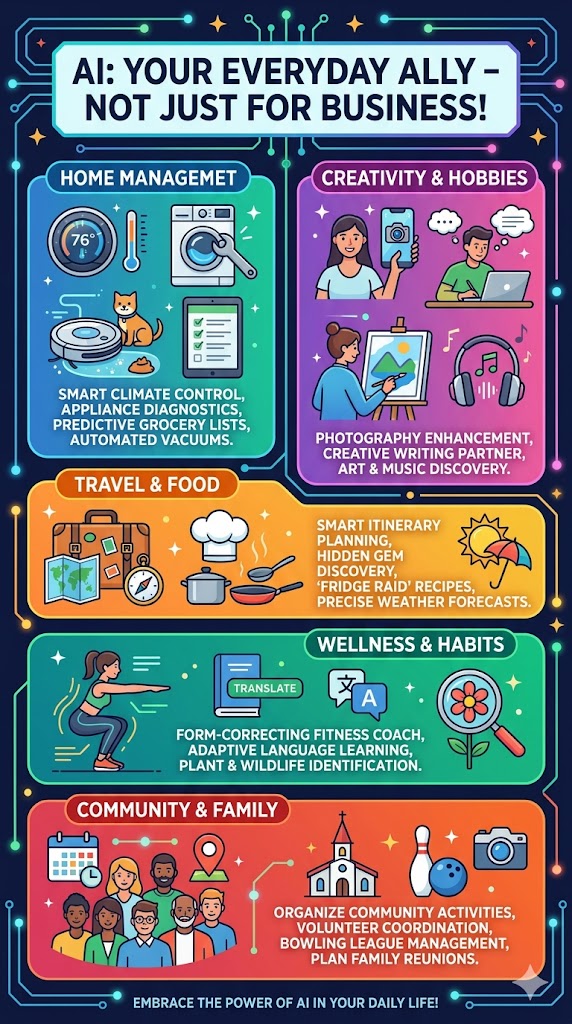
AI can be a helpful ally in all parts of your daily life!
For more on integrating these tools into a structured content process, see: Your AI Workflow for Writing Blog and Article Posts: A Beginner’s Upgrade Kit.
What Are the Most Common Mistakes Beginners Make With Everyday AI Tools?
Knowing what to avoid is half the battle. Here are the pitfalls that slow most new users down:
- Vague prompts. “Write me something about marketing” will produce something about marketing — and it will be forgettable. The more context you give, the better the result. Include audience, tone, length, and purpose.
- Treating the first output as final. The first draft is always a first draft. Plan to iterate at least once or twice.
- Using AI for facts without verifying. These tools can hallucinate — a polite way of saying they occasionally make things up with great confidence. Always verify statistics, dates, and citations. Perplexity is the safest of the four for factual claims because it links to its sources.
- Expecting magic, not assistance. AI tools amplify your thinking. If you feed them garbage, you get polished garbage back. Bring your own expertise to the conversation.
- Giving up after one bad output. A single mediocre result is not evidence the tool cannot help you. Rephrase the request and try again. Prompting is a skill you build, and it builds quickly.
- Skipping the free tier. You do not need to pay anything to get genuine value from ChatGPT, Gemini, Copilot, or Perplexity. Start free, upgrade only when you hit real limitations.
How Do Everyday AI Tools Fit Into the Bigger Picture of Becoming an AI Practitioner?
There is an important distinction worth making. An AI beginner wonders what these tools are. An AI practitioner builds habits around using them deliberately and improves those habits over time.
The jump between those two stages is smaller than most people imagine. It is not a certification, a course, or a technical leap. It is a decision to incorporate everyday AI tools into your regular workflow, even imperfectly, and to reflect on what worked and what did not.
Here is a simple three-part framework for making that jump:
- Use it daily for 14 days. Pick one tool and use it on at least one real task every workday for two weeks. This is how the habit forms; not through studying, but through repetition.
- Keep a two-sentence log. Each day, write down what you used it for and whether the output saved you time. Patterns will emerge quickly.
- Add a second tool in week three. Once your first tool feels natural, introduce a second one for a specific, different use case. This builds your toolkit organically rather than overwhelming you all at once.
For more on this transition, my article AI for Beginners: A Simple Guide to Understanding Artificial Intelligence is an excellent companion read.
If you are thinking about whether AI skills are worth formalizing for your career, check out: The Value of AI Certifications.
Are Everyday AI Tools Safe and Private to Use?
This is the question every thoughtful user, and every nervous manager, eventually asks. Here is an honest answer:
- All four major tools have privacy settings you should review. By default, conversations on ChatGPT’s free tier can be used to improve the model. You can turn this off in settings.
- Do not paste confidential client data, proprietary strategies, or personal identifying information into a public AI chat interface. Treat it the way you treat email by assuming it could be seen by someone else.
- Enterprise tiers offer stronger data protections. Microsoft Copilot for Microsoft 365 Business, for example, includes enterprise-grade compliance controls. If your organization has sensitive data requirements, check whether an enterprise license is appropriate.
- Perplexity pulls from the live web. It does not train on your conversations, but it does pass your queries to external search systems. Factor that into what you share.
The bottom line: use common sense. Everyday AI tools are powerful, but they are not a sealed vault. Treat your inputs accordingly.
What Should You Do Right Now to Start Using Everyday AI Tools Today?
Reading about AI tools without using them is like reading a cookbook and staying hungry. Here is your action list — with no ambiguity:
-
Choose one tool and create a free account.
Go to chat.openai.com (ChatGPT), gemini.google.com, copilot.microsoft.com, or perplexity.ai. All free. All start in under three minutes. I recommend ChatGPT! -
Identify your most repetitive writing task this week.
Status updates? Meeting summaries? Social captions? Client follow-ups? Pick one. -
Describe that task to the AI in one or two sentences.
Include context: who it is for, what tone you need, how long it should be. Hit enter. -
Refine the result through conversation.
Do not start over. React. Ask it to adjust. Treat it like a first draft from a capable colleague. -
Do it again tomorrow.
That is the whole secret. Daily use, real tasks, gentle iteration. You will be surprised how quickly the tools feel second nature.
If you want to understand the deeper mechanics behind these tools before you dive in, my book AI for Beginners Demystified is specifically written for people in your exact situation, curious, capable, and ready to stop watching from the sidelines.
And if you want to understand why so many people resist getting started in the first place, this article has the honest answer: AI Intimidation: Why People Fear AI and Why They Shouldn’t.
 Rick Samara
Author · AI Educator · Former U.S. Air Force Intelligence Analyst
Rick Samara is the author of AI for Beginners Demystified, a plain-language guide to artificial intelligence for readers of every background. Drawing on his experience as a U.S. Air Force Intelligence Analyst and marketing entrepreneur, Rick specializes in making complex AI concepts approachable through humor, storytelling, and real-world examples. His work centers on one conviction: that you do not need to be technical to benefit from AI. You just need to start. Follow his writing at ricksamara.com/articles.
Frequently Asked Questions
What is the best everyday AI tool for a complete beginner?
For most beginners, ChatGPT (free tier) is the best starting point. It has the largest community, the most tutorials, and the most forgiving learning curve. If your work already uses Google Workspace, Gemini is a close second because it integrates where you already spend your time. And, if you are already paying $20 or so for Google Workspace, that price should include Gemini Pro, which is the paid upgrade.
Do I need to pay for any of these everyday AI tools to get real value?
No. All four tools — ChatGPT, Google Gemini, Microsoft Copilot, and Perplexity — offer meaningful free tiers. You will hit limitations eventually (slower speeds, limited file uploads, usage caps), but most beginners get months of genuine value from the free versions before needing to upgrade.
Can I use multiple everyday AI tools at the same time?
Absolutely, many professionals do. A common setup is using Perplexity for fast, cited research, ChatGPT for drafting and creative work, and either Copilot or Gemini for tasks inside Microsoft or Google apps. The tools are not mutually exclusive; they are complementary.
How do I write a good prompt for an everyday AI tool?
A good prompt includes four things: what you want (the task), who it is for (the audience), the tone or style you need, and any relevant constraints (length, format, things to avoid). Example: “Write a 200-word LinkedIn post announcing our new product launch. Audience is small business owners. Tone should be enthusiastic but professional. Avoid buzzwords like ‘game-changer.'”
Are everyday AI tools safe to use with sensitive business information?
Use caution. Public-facing free tiers, particularly ChatGPT’s free version, may use your inputs to improve the model unless you opt out in settings. Do not paste confidential client data, trade secrets, or personally identifiable information into a consumer AI interface. For sensitive business use, look into enterprise tiers, which offer stronger privacy controls.
What is the difference between Perplexity AI and the other everyday AI tools?
Perplexity is primarily a research and search tool. Every answer it gives comes with numbered citations linked to live web sources, making it the most transparent of the four for factual claims. The other tools are more versatile for creative and generative work, but less focused on sourced research. Use Perplexity when accuracy and provenance matter; use the others when you need to generate, create, or brainstorm.
How long does it take to get comfortable with everyday AI tools?
Most users feel noticeably comfortable within one to two weeks of daily use. The key word is daily. Occasional use extends the learning curve significantly. Like any skill, typing, driving, cooking, repetition with real stakes accelerates the learning curve far better than any tutorial.
Further Reading
The following sources were consulted in the preparation of this article. All links are do-follow and open to external resources that extend the concepts discussed above.
[1] OpenAI. (2024). GPT-4o system card. OpenAI Technical Documentation.
[2] Google DeepMind. (2024). Gemini: A family of highly capable multimodal models. Google Research.
[3] Microsoft. (2025). Microsoft Copilot: Your everyday AI companion. Microsoft Learn Documentation.
[4] Perplexity AI. (2025). How Perplexity works: Search, answer, and cite. Perplexity AI Blog.
[5] Mollick, E. (2024). Co-intelligence: Living and working with AI. Portfolio/Penguin.
[6] Samara, R. (2025). AI for beginners demystified. Available on Amazon and Barnes & Noble.
[7] Brynjolfsson, E., & McAfee, A. (2014). The second machine age: Work, progress, and prosperity in a time of brilliant technologies. W. W. Norton & Company.
[8] Ng, A. (2024). AI for everyone. DeepLearning.AI / Coursera.